Fake Call
Fake incoming call that looks like your real phone, to get out of anything
Версия 1.0.0 · 3.6 MB · 16 нояб. 2026
Скачивая, вы принимаете Условия использования.
Schedule a fake phone call from anyone. It rings with your own ringtone and shows your phone's real call screen, so nobody can tell it's not a real call.
Stuck in a meeting that won't end, an awkward date, or a conversation you can't leave? Set who calls (Mom, Boss, anyone), pick when it rings (10 seconds, 10 minutes or an exact time) and put your phone away. The call arrives on time, even with the app closed or the phone locked. It's your polite excuse to step out.
The call screen matches your phone automatically: Samsung, vivo, Xiaomi, Redmi, POCO, OPPO, OnePlus, realme and Google Pixel each get their own real-looking screen. Answer it and the timer runs, the screen goes dark at your ear, and a voice you recorded can play as the caller.
No ads, no account, no internet permission. Everything stays on your phone.
- Fake incoming call that looks exactly like your phone's own call screen
- Matches Samsung, vivo, Xiaomi, Redmi, POCO, OPPO, OnePlus, realme and Pixel
- Rings with your phone's real ringtone and vibration
- Schedule the call: 10 seconds, minutes, or an exact time
- Works with the app closed and the phone locked
- Set caller name, number, label and photo
- Record a caller voice that plays when you answer
- Answer, mute, speaker and keypad work like a real call
- Quick call from the Quick Settings tile or by holding the app icon
- Ring again if missed
- Hide the app as Calculator, Clock, Notes and more
- No ads, no account, no internet permission
Требуется: Android 8.0 or newer
- Проверено перед публикацией
- Проверить на VirusTotal
- Оцените это приложение первым
- Помощь с Fake Call
История версий и контрольные суммы SHA-256
-
Версия 1.0.016 нояб. 2026, 3.6 MB
77ca164f1b9a43fb4a0b0c2f6c026682edc96cac3ed27cf5613283b2f9d3a0e4
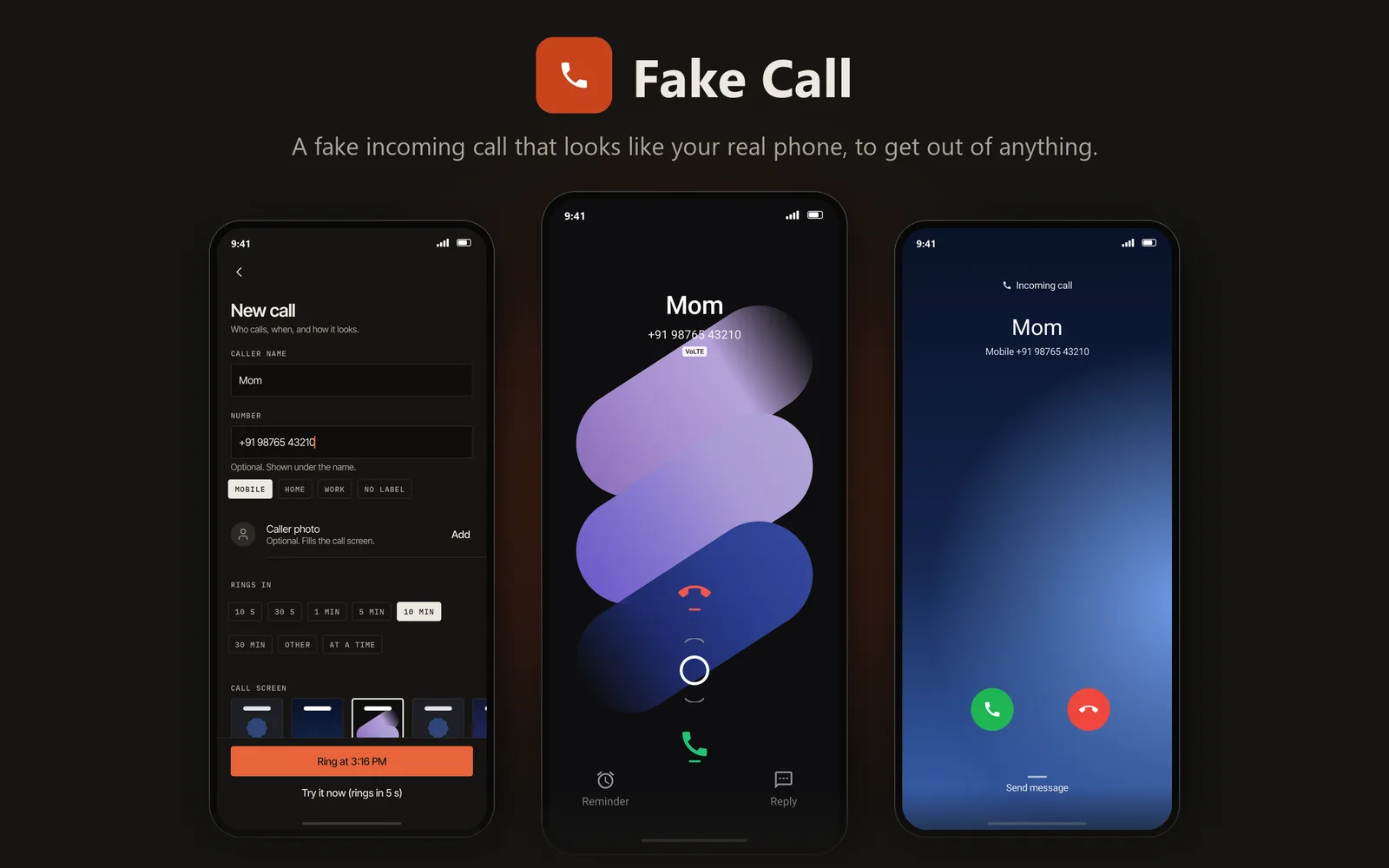
- Looks like your phone's real call screen
- Your excuse to leave any meeting or date
- Rings with your own ringtone
- No ads, no internet permission
Как установить приложение для Android
Три шага, и файл можно проверить перед установкой.
Скачайте APK
Откройте эту страницу на телефоне и нажмите «Скачать» у нужного приложения.
Разрешите установку
В первый раз Android попросит разрешить установку из браузера. Включите «Разрешить установку из этого источника».
Откройте и установите
Откройте скачанный файл и нажмите «Установить». Чтобы проверить его заранее, выполните команду ниже на компьютере с Windows.
certutil -hashfile "FakeCall-1.0.0.apk" SHA256