Fake Call
Fake incoming call that looks like your real phone, to get out of anything
Versi 1.0.0 · 3.6 MB · 16 Nov 2026
Dengan mengunduh, kamu menyetujui Ketentuan Layanan.
Schedule a fake phone call from anyone. It rings with your own ringtone and shows your phone's real call screen, so nobody can tell it's not a real call.
Stuck in a meeting that won't end, an awkward date, or a conversation you can't leave? Set who calls (Mom, Boss, anyone), pick when it rings (10 seconds, 10 minutes or an exact time) and put your phone away. The call arrives on time, even with the app closed or the phone locked. It's your polite excuse to step out.
The call screen matches your phone automatically: Samsung, vivo, Xiaomi, Redmi, POCO, OPPO, OnePlus, realme and Google Pixel each get their own real-looking screen. Answer it and the timer runs, the screen goes dark at your ear, and a voice you recorded can play as the caller.
No ads, no account, no internet permission. Everything stays on your phone.
- Fake incoming call that looks exactly like your phone's own call screen
- Matches Samsung, vivo, Xiaomi, Redmi, POCO, OPPO, OnePlus, realme and Pixel
- Rings with your phone's real ringtone and vibration
- Schedule the call: 10 seconds, minutes, or an exact time
- Works with the app closed and the phone locked
- Set caller name, number, label and photo
- Record a caller voice that plays when you answer
- Answer, mute, speaker and keypad work like a real call
- Quick call from the Quick Settings tile or by holding the app icon
- Ring again if missed
- Hide the app as Calculator, Clock, Notes and more
- No ads, no account, no internet permission
Membutuhkan Android 8.0 or newer
- Dipindai sebelum diterbitkan
- Pindai di VirusTotal
- Jadilah yang pertama menilai aplikasi ini
- Dapatkan bantuan untuk Fake Call
Riwayat versi dan checksum SHA-256
-
Versi 1.0.016 Nov 2026, 3.6 MB
77ca164f1b9a43fb4a0b0c2f6c026682edc96cac3ed27cf5613283b2f9d3a0e4
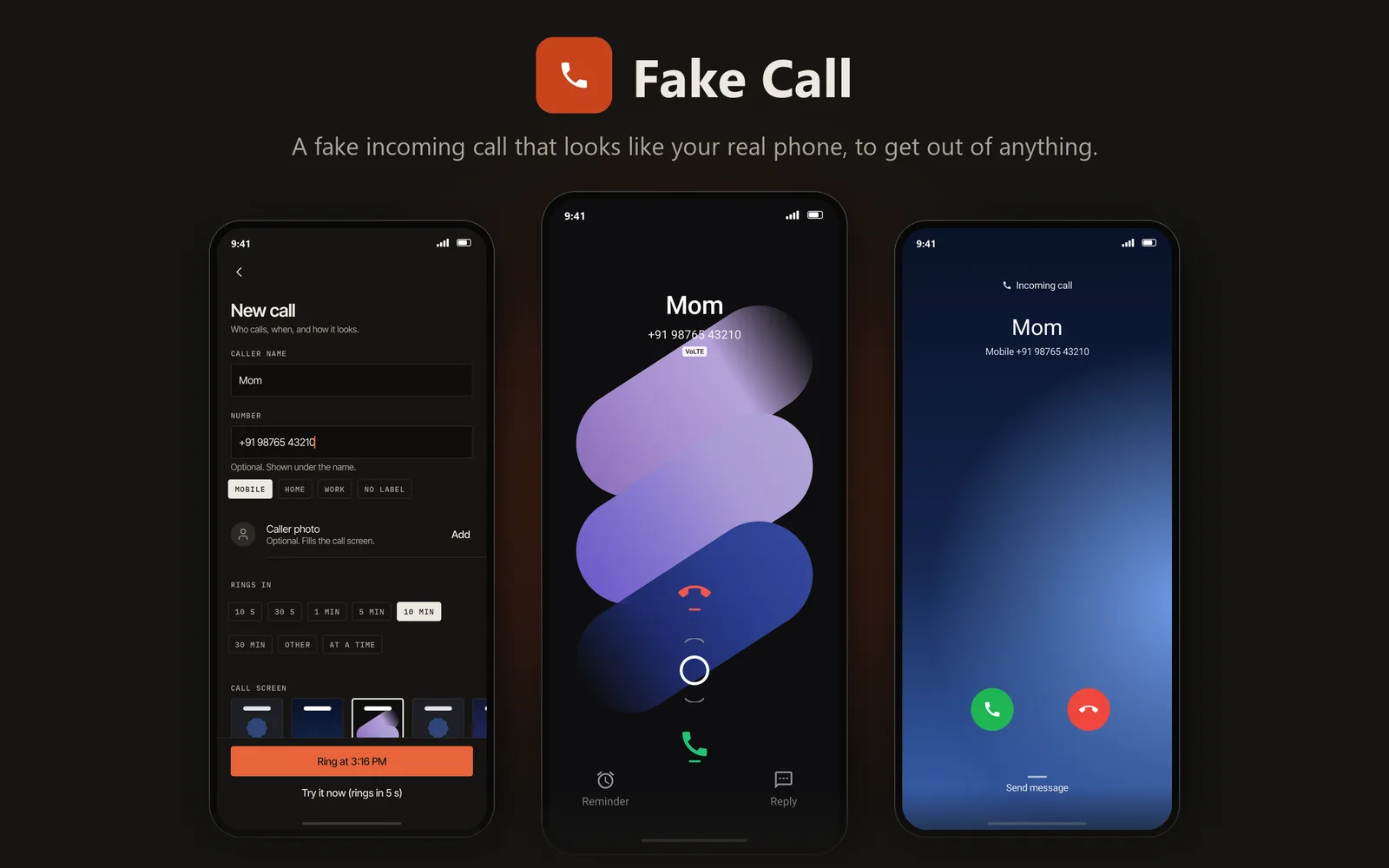
- Looks like your phone's real call screen
- Your excuse to leave any meeting or date
- Rings with your own ringtone
- No ads, no internet permission
Memasang aplikasi Android
Tiga langkah, dan kamu bisa memeriksa file sebelum memasangnya.
Unduh APK
Buka halaman ini di ponselmu dan ketuk tombol Unduh pada aplikasi yang kamu mau.
Izinkan pemasangan ini
Pertama kali, Android meminta izin untuk memasang dari browser-mu. Aktifkan Izinkan dari sumber ini.
Buka dan pasang
Buka file yang diunduh dan ketuk Pasang. Untuk memeriksanya dulu, jalankan perintah di bawah di PC Windows.
certutil -hashfile "FakeCall-1.0.0.apk" SHA256