Every version has a scan report
Android apps from Samy Tools, ready to download directly from this page.
-
Daily Selfie
A private daily selfie journal. Your photos never leave your phone.
By downloading, you agree to the Terms of Service.
Daily Selfie
A private daily selfie journal. Your photos never leave your phone.
Take your daily photo and watch your journal grow. Daily Selfie keeps every picture on your phone, stored encrypted inside the app.
No one else can see your photos. They are never uploaded or sent to us, they are left out of cloud backups, and your journal stays locked behind your fingerprint or face.
- Photos never leave your phone
- Encrypted journal, locked with your face or fingerprint
- Never uploaded and left out of cloud backups
- Take your daily photo with the camera
Requires Android 7.0 or later on a 64-bit phone
Download Daily Selfie- Scanned before publishing
- Open the VirusTotal report
- Be the first to rate this app
- Get help on Discord
By downloading, you agree to the Terms of Service.
Version history and SHA-256 checksums
-
Version 1.0.07 Nov 2026, 57.4 MB
- First release
219631ed864dbde4eaeb1d77eebd67033b682dc48964ab1fe5d65a431df0a412
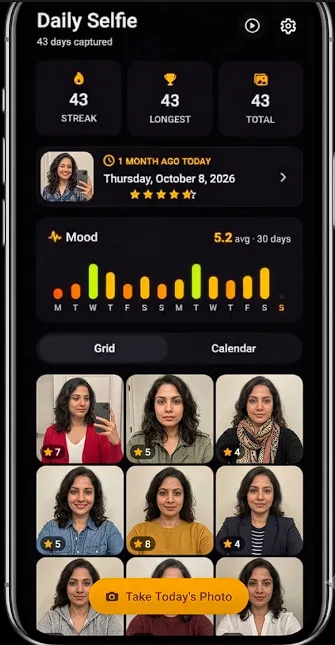
- Rate your day, and write
- No Ads
- Eye-Align Slideshow
- Journal Your Everyday
No viruses, adware or hidden extras
We build these apps ourselves and publish them here directly. You get the same file we scanned, with nothing added on the way.
-
No viruses or malware
We don't put viruses, spyware or crypto miners in our apps. Every file is scanned before it goes on this site.
-
Nothing bundled
No toolbars, adware or offers for other software. You only get the app you chose.
-
Public scan reports
Each version links to its VirusTotal report, so you can see what dozens of antivirus engines say about the file.
-
A checksum for every file
Each version lists its SHA-256, so you can confirm your download is exactly the file we published.
No scan can catch everything, so keep your own antivirus switched on and only download our apps from this site.
Installing an Android app
Three steps, and you can check the file before you install it.
Download the APK
Open this page on your phone and tap the Download button for the app you want.
Allow this install
The first time, Android asks for permission to install from your browser. Turn on Allow from this source.
Open and install
Open the downloaded file and tap Install. To check it first, run the command below on a Windows PC.
certutil -hashfile "DailySelfie-1.0.0.apk" SHA256Download and safety questions
Plain answers to what people ask most.
Are these apps free of viruses?
Yes. We don't put viruses, spyware or adware in our apps, and we scan every file before we publish it. You can also open each version's VirusTotal report and check it yourself.
Why did my antivirus flag a file?
Antivirus tools sometimes flag new apps from small developers by mistake. Compare the file's SHA-256 with the one on this page and open its VirusTotal report. If you're still unsure, don't run the file and ask us on Discord.
Why does Android warn me before installing?
Android asks for permission before installing apps from outside an app store, and Google Play Protect may check the app as well. The warning doesn't mean a virus was found.
How can I tell a file hasn't been changed?
Compare your file's SHA-256 with the one listed for that version. If the two match, you have exactly the file we published. Copies from other websites may not match.
Do I need an account or have to pay?
No. Our apps are free to download and you don't need an account. Just choose an app and press Download.
Where can I get help with an app?
Join our support server on Discord and ask there. You can report a problem, ask a question or suggest an idea.
How can I tell other people what I think?
Rate any released app on our Ratings page. You choose the stars, and you can add a comment if you want to.